Welcome to the Documents and Forms area.
This page has changed to a new, more secure sign-in process with a free account and extra protection using two-factor authentication (2FA).
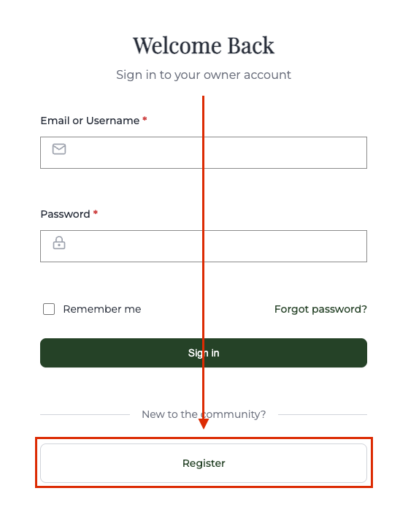
Log in to the new Property Owner Portal System at https://sanctuaryatbayhill.com/hoa-login with your username and password. If you need to register for a new account, click the “Register” button on that page.
This Property Owner Portal system provides document transparency, helps protect your personal information, and supports Florida privacy and security requirements (Florida Statute 718.111(12)(g)) for HOA records and online access.
Why is this change good?
The new sign-in process will help keep your account safer, make it easier to protect your documents, and give the community a more secure way to manage private information.
Two-factor authentication adds a second check when you sign in, helping protect your account even if your password is stolen or compromised.
TIP: Always use a unique and strong password for every site. Use a password manager to help you remember and use unique and strong passwords.
You will also have your own account, which makes it easier to manage access, reset your password, and keep your information current.
What are the next steps?
Overview
- Register a new account, confirm your information, and set up 2FA using an app on your phone the first time you sign in. We recommend you download Google Authenticator, Microsoft Authenticator, or Authy before you begin the signup process, and that you complete the registration process on a regular computer rather than a phone.
- The new account will use your email address and a password you choose.
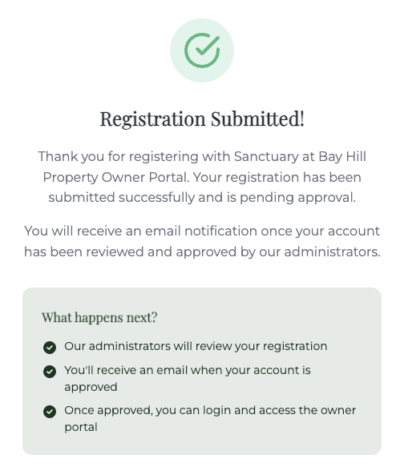
- After you register, you may need to wait briefly for approval before you can sign in.
- When your account is ready, you will sign in with your email and password, then enter a code from your phone’s authenticator app.
- This is subject to the Sanctuary at Bay Hill Terms of Service and Privacy Policy. If you would like to preview these policies, see Terms of Service and Privacy Policy.
Steps
Go to https://sanctuaryatbayhill.com/hoa-login and click Register.
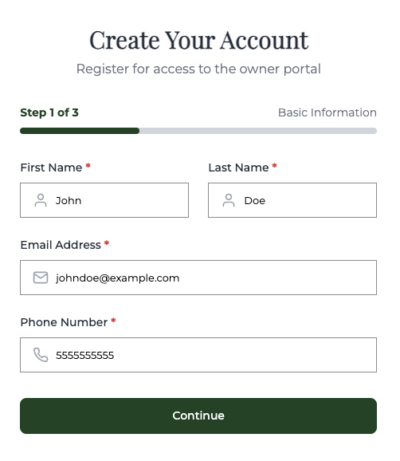
- Step 1: Enter your first name, last name, email address, and phone number. Then click “Continue”.
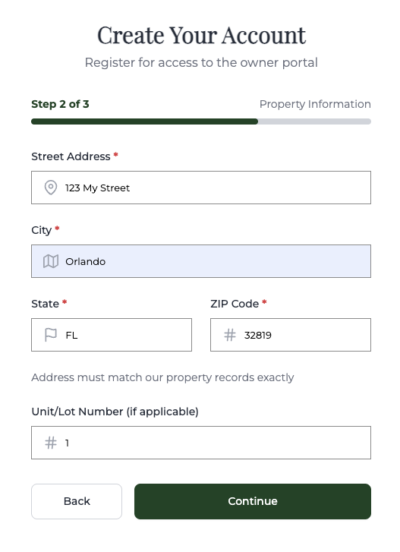
- Step 2: Enter your street address, city, state, Zip Code, and unit/lot number (if applicable), then click “Continue”. The address must match our property records to approve your registration.
- Step 3: Create a password, entering it twice to confirm. Your password must be strong and 12 characters long to be secure enough for our system. Click the “I agree to the Terms of Service and Privacy Policy” checkbox.
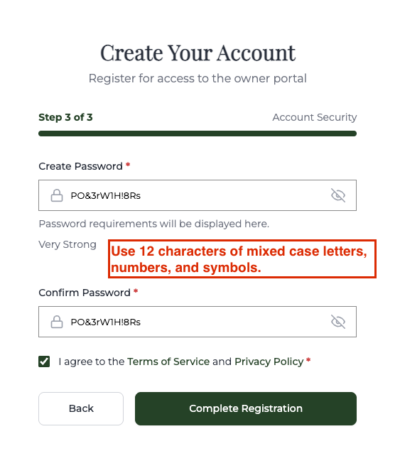
When you complete the registration, it will be reviewed, and you will receive an email notification once it has been approved by our administrators.
Logging In
Once it’s approved, to log in to your new account, go to https://sanctuaryatbayhill.com/hoa-login. Enter your username and password. Optionally click “Remember Me” to have your login remembered for 14 days. Click “Sign in”. Use your authenticator app to enter the 2FA code. You now have full access to the Property Owner Portal.
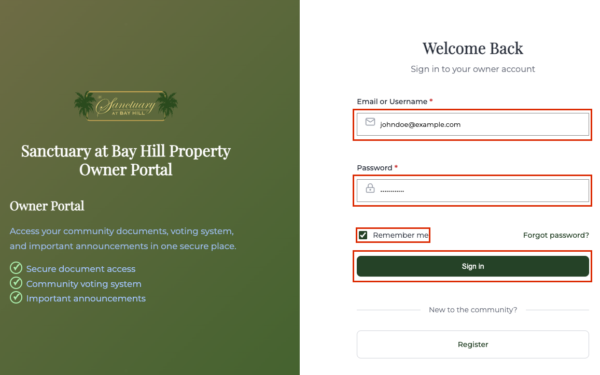
If you forgot your password, click on “Forgot Password?”, enter your email, click “Send Reset Link”, and a password reset link will be emailed to you.
On your first time logging in as a newly approved user:
- Step 1: On your first time logging in as a new user, you’ll need to scan a QR code with the app (see above). Then click “Next”.
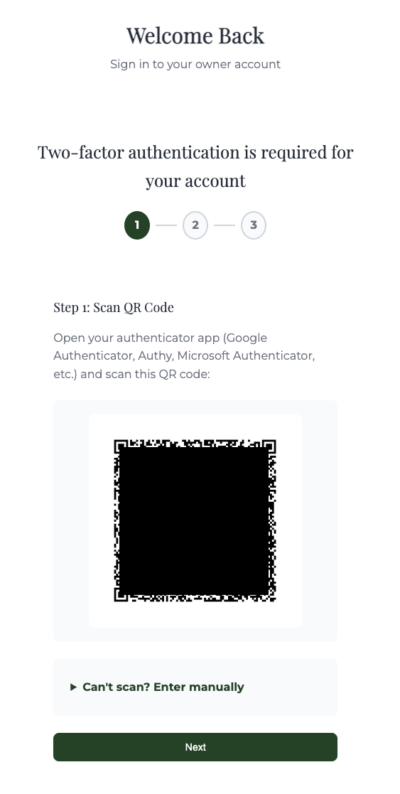
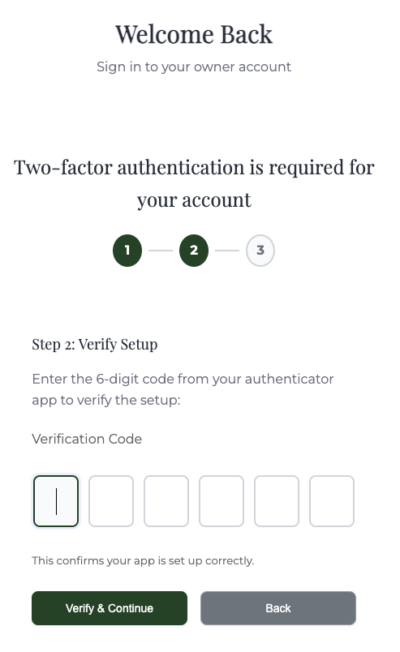
- Step 2: Enter the code the app gives you. The code changes every 30 seconds, so be sure to enter the latest code. Then click “Verify & Continue.
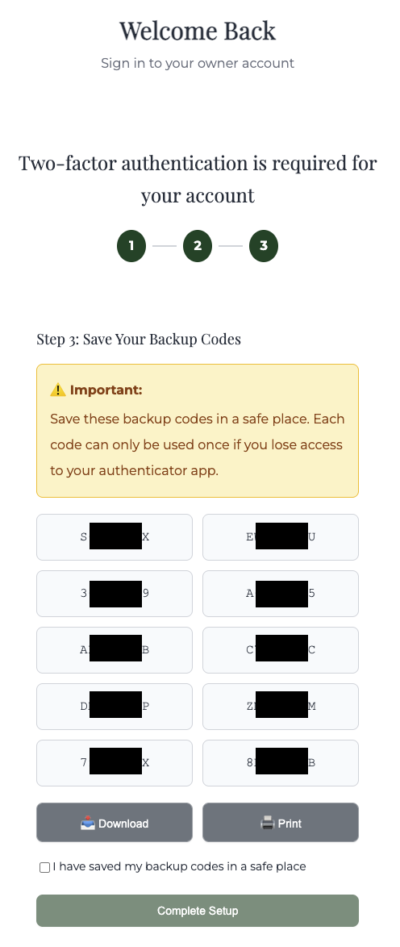
- Step 3: Should you ever lose access to your phone or app, the system gives you a set of backup codes you can use to get access to the documents. Simply download, print, or even write down the backup codes and keep them in a safe place. Check the “I have saved my backup codes in a safe place” checkbox. Then click “Complete Setup”.
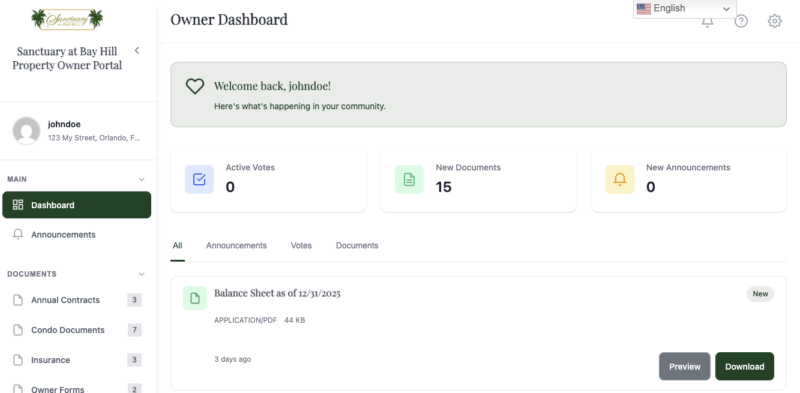
At this point, you’ll be redirected to the Property Owner Portal. This is an example of what you’ll see: